












Kubernetes getting started quickly and easily.

It is no longer difficult with ‘IXcloud® Kubernetes’ getting started quickly and easily.
Are you hesitant to adopt Kubernetes because of its high difficulty and complexity?
IXcloud makes Kubernetes easy. IXcloud Kubernetes Service (IKS) automates all processes
required to get started with Kubernetes, from cluster installation, configuration, and deployment.
Get started now with IXcloud Kubernetes.

Deployment and management
of one-click clusters
Complete configuration and deployment
of clusters with one click.
Auto-scaling
(expanding and contracting)of pods
Auto-scaler that automatically
expands and contracts pods as needed
with real-time monitoring

A to Z Guide
on Kubernetes
Provides detailed guides
from Kubernetes concepts to tutorials, including YAML files

Compatible with
standard Kubernetes
CNCF-certified; compatible with standard Kubernetes environment; Kubernetes standard APP and SW can be utilized
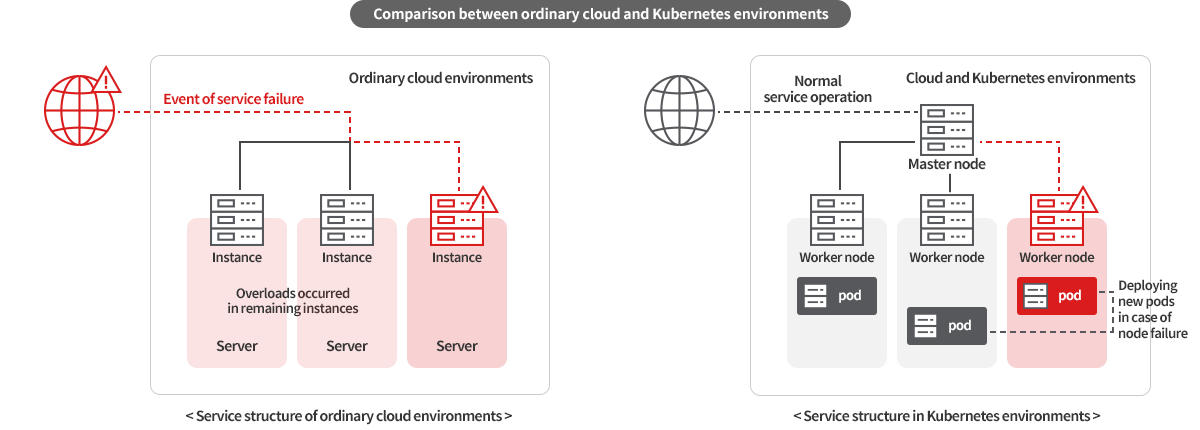
One of the biggest differences between Kubernetes and other clouds is the durability and elasticity of the service environment.
In a typical cloud environment, the failure of just one instance can affect the entire service.
By contrast, in a Kubernetes environment, pods have respective roles and run independently from other nodes(instances).
Thus, even in an event of a node fail, the continuity of the service is not depreciated as new pods are automatically deployed to replace the troubled pods.
In addition, Pods are automatically added or deleted accordingly to the environment value set, guaranteeing faster responses than instance autoscaling.
Expanding or recovering failures can much smoothly be done.

Creating clusters within a click
Simply create a cluster from the IXcloud console without the cumbersome process. A cluster can be directly created with the default values suggested by the console. Then, grasp Kubernetes operations at a glance through the monitoring dashboard.
Kubernetes Dashboard
Provides a detailed status of resources used in the cluster in the form of a dashboard. You can view namespaces, workloads, pods, services & networks, configurations, and events at a glance in the form of graphs and charts.

Hands-free Pod Auto-scaler
Frustrated from managing resources for your service operation? Simply manage with the help of IKS Auto-scaler. IKS's Auto-scaler automatically expands and contracts the number of pods through real-time monitoring. This enables you to be prepared for unexpected loads and can help you reduce costs and ensure high availability.
- Services with a short product release cycle (CI/CD)
- Services managed by multiple teams (Helm)
- Fast test environment and data storage (PV)
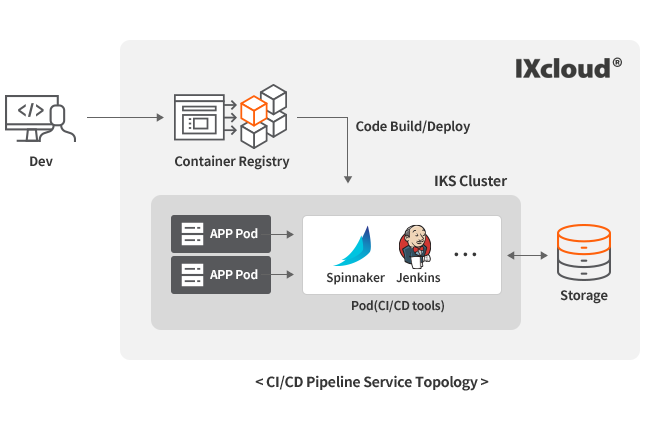 |
Services with a short product release cycle (CI/CD)
For services with a short product release cycle, fast build and deployment of service code is essential.
The need of a CI/CD environment that automates code integration and deployment is surely in required. * Continuous Integration, Continuous Delivery |
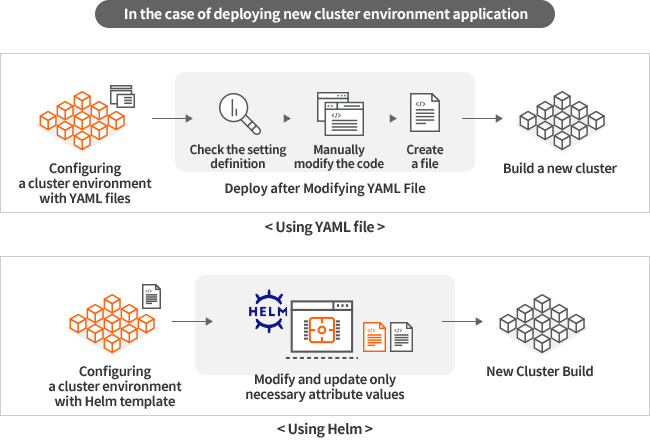 |
Services managed by multiple teams (Helm)
If multiple teams are managing the service together, multiple clusters will be in operation.
This means, applications may need to be run on a new cluster from time to time. |
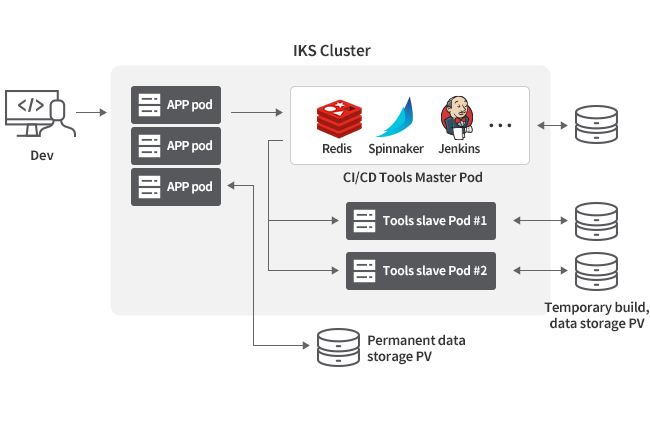 |
Data storage and rapid test environment (PV)
Pods that perform tasks in Kubernetes are created and deleted while moving from one node to another without being dependent on a specific node.
The data within the pods will also be deleted and restarted accordingly. But what if you need this data? How will you be able to save them? |
| Category | Monthly fee (KRW, VAT excluded) |
|---|---|
| Cluster | 100 won/hour |
| Nodes (VMs) | An hourly rate is charged based on the node (VM) specification that is created. |
Are you at a loss about how to get started with Kubernetes and how to configure it?
If so, consult with an IXcloud engineer who possesses expertise in Kubernetes deployment and operation.
For Transformation to Kubernetes, IXcloud is here to help.



 AWS Direct Connect
 GCP Cloud Interconnect
 NCP Cloud Connect
 NHN Cloud Connect
 MS Express Route
 Oracle FastConnect
 IXcloud KDX