












Snapshot backup for server backup, expansion, etc.
Snapshot Backup

Taking a snapshot means to save the current condition of a virtual server or storage in a cloud environment, as if taking a photograph of it. Snapshot backup means to restore a volume to the previous state when an incorrect modification is made to the data in operation. It is similar to the System Restore feature in Windows.
Contact an Expert
Price

| Category | Monthly Rate (VAT not included) | Note |
|---|---|---|
| General Snapshot | Per each Snapshot KRW 25/GB | Charges apply based on the size of the storage allocated. |
| Schedule Snapshot | Per each Snapshot KRW 25/GB |
How to Use

1. Select the server/storage
- Select the server/storage you want to save as a snapshot.
2. Save a snapshot
- Click the Create Snapshot button to save a snapshot of the server/storage. The snapshot that gets created can be checked under the Image menu.
3. Use a saved snapshot
- Once your account is activated successfully, you can log into the backup service.
4. Confirm server/storage creation
- You should be able to see that the server/storage in the same environment as the server saved as a snapshot has been created.
1. Select the volume
- Select the volume to be saved as a snapshot on a regular basis.
2. Select option and save
- Choose the snapshot creation cycle and storage period and save the schedule.
3. Create snapshots
- Snapshots will be created according to the designated schedule. You can check the created snapshots in the list of scheduled snapshots.
4. Automatic deletion of snapshots
- Snapshots will be deleted when their retention period has elapsed. Even if the retention period remains, snapshots in excess of the maximum number of snapshots allowed in storage will be automatically deleted.
5. Maintain Snapshots
- Snapshots that need to be retained without being automatically deleted will be converted into general snapshots and be saved.
Utilization
-
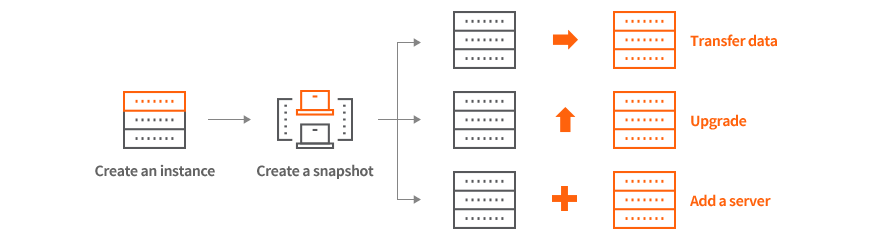
Snapshots facilitate not only for backup but also for adding servers.
- In case of needing to transfer data to a different server to replace an old server
- In case of wishing to upgrade the server to a higher specification
- In case of needing to add a server with the same environment as the server that was tested for application distribution



 AWS Direct Connect
 GCP Cloud Interconnect
 NCP Cloud Connect
 NHN Cloud Connect
 MS Express Route
 Oracle FastConnect
 IXcloud KDX